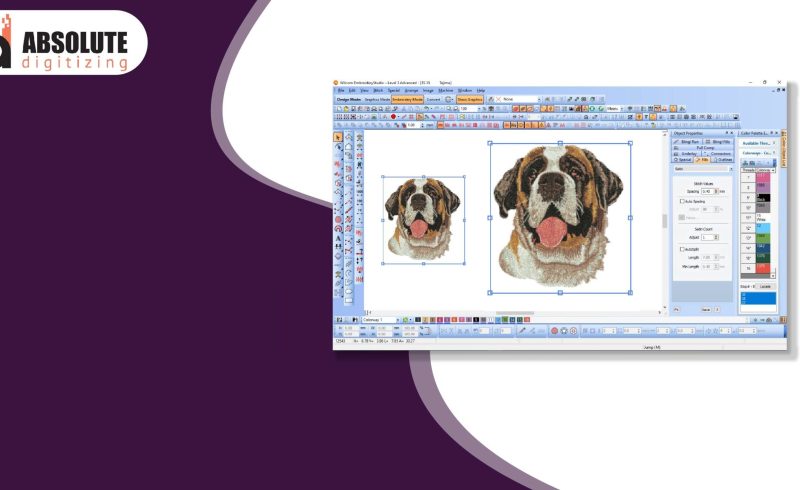

Changing the size of an embroidery file is common. You may need a logo for a cap, shirt, bag, or jacket. One design may need many sizes. But if you change size the wrong way, the design can lose shape and stitch quality.That is why many users first learn How to Resize Embroidery Designs before making edits.
Size changes affect stitch count, spacing, text detail, and fabric pull. A design that looks great at one size may fail at another if it is not adjusted the right way.
The good news is that you can resize files with clean results when you use smart steps. In this guide, you will learn beginner-friendly ways to modify embroidery file size while keeping stitches neat, sharp, and strong.
Embroidery files are made with stitches placed in exact spots. When you change size, those stitch spots move.
This can cause:
That is why resizing needs care.
There are two common ways to change file size.
Some machines or simple apps only stretch the file bigger or smaller.
This changes shape size, but may not fix stitches.
Good embroidery software changes the size and adjusts stitches too.
This often gives better results.
If possible, use software made for embroidery editing.
Many designs can handle small changes.
Some files allow more. Some allow less.
It depends on:
Always test first.
Making a design larger may seem easy, but it can create gaps.
Use software that adds or adjusts stitches when scaling up.
Shrinking files often causes more trouble than enlarging.
Reduce fine detail. Widen thin lines. Simplify text if needed.
A poor file becomes worse when resized.
Use clean source files with:
Good files resize better than bad ones.
Embroidery editing software helps protect stitch quality.
Useful tools include:
Good tools save time and reduce mistakes.
Density means how close stitches are packed.
After resizing, inspect density and adjust if needed.
Satin stitch is common in text and borders.
Very wide satin may snag or look loose.
Very thin satin may not cover well.
Convert wide satin to fill stitch if needed. Widen thin satin lines when shrinking.
Text is one of the first things to fail after resizing.
Readable text matters more than exact style.
Before resizing, know your hoop size.
This helps you choose the best final size without guessing.
A design for a 5×7 hoop may need edits for a 4×4 hoop.
Plan first. Then resize once.
Many edits can lower quality.
A file may look good on screen but stitch badly on fabric.
Always test on fabric close to the final item.
Real testing gives real answers.
Resized files still need support.
Best for shirts and stretch items.
Best for woven fabric.
Used for special jobs.
Wrong support can make a good resized file look bad.
If you shrink a design with detail, use slower speed.
This helps with:
Speed matters more than many beginners think.
When stitches run, fabric moves.
After resizing, pull effects may change.
Good software may let you edit this. If not, test and adjust the file again.
When I need a new size, I do not just click scale and save.
I first check if the design has small text or fine detail. Then I change size in embroidery software. After that, I review density, satin width, and outlines. Next, I run a sample stitch.
This method takes a little time, but it saves wasted shirts and thread.
One logo may need three sizes for different items.
Write notes like:
This builds a smart file library for future work.
Tiny details may fail.
Gaps can appear.
Can waste blank items.
Machine may not open file.
Leads to poor quality.
Avoid these simple mistakes.
Sometimes resizing is not enough.
A fresh file may be the best option.
Start with simple designs.
These teach how size affects stitches.
This routine improves success.
Resizing is part skill and part testing.
Each project teaches:
Experience grows fast when you track results.
Many users guess a new size and start stitching. This often leads to waste.
A better way is:
This builds trust in your results and helps your work look professional.
You can modify embroidery file size and still keep clean stitch quality when you use the right steps. Start with a strong original file. Use embroidery software, not simple stretch tools. Check density, text, satin width, and outlines after every change.
Test on real fabric, use proper stabilizer, and keep notes for future jobs. Small smart steps lead to better results. With practice, you will resize files with confidence and create clean embroidery for caps, shirts, bags, and more.